
How To Use the MySubaru App
How To Use the MySubaru App
Unlock the Full Potential of Your Subaru with i.g. Burton Subaru of Glen Burnie.
Your Subaru is built for adventure, and the MySubaru App is built to keep you connected to it. With features like remote vehicle controls, health reports, and hassle-free service scheduling, managing your car has never been more convenient. At i.g. Burton Subaru of Glen Burnie, your ownership experience is our top priority. Our friendly team is ready to walk you through downloading and configuring the app so you can start enjoying its features today. Whether you're navigating the daily hustle of I-695, commuting into Baltimore, or heading out for a relaxing weekend along the Chesapeake Bay, you deserve absolute peace of mind on the road, and the MySubaru App does just that. Read on to learn how to set up the MySubaru App and explore what it can do for you!
What Is the MySubaru App?
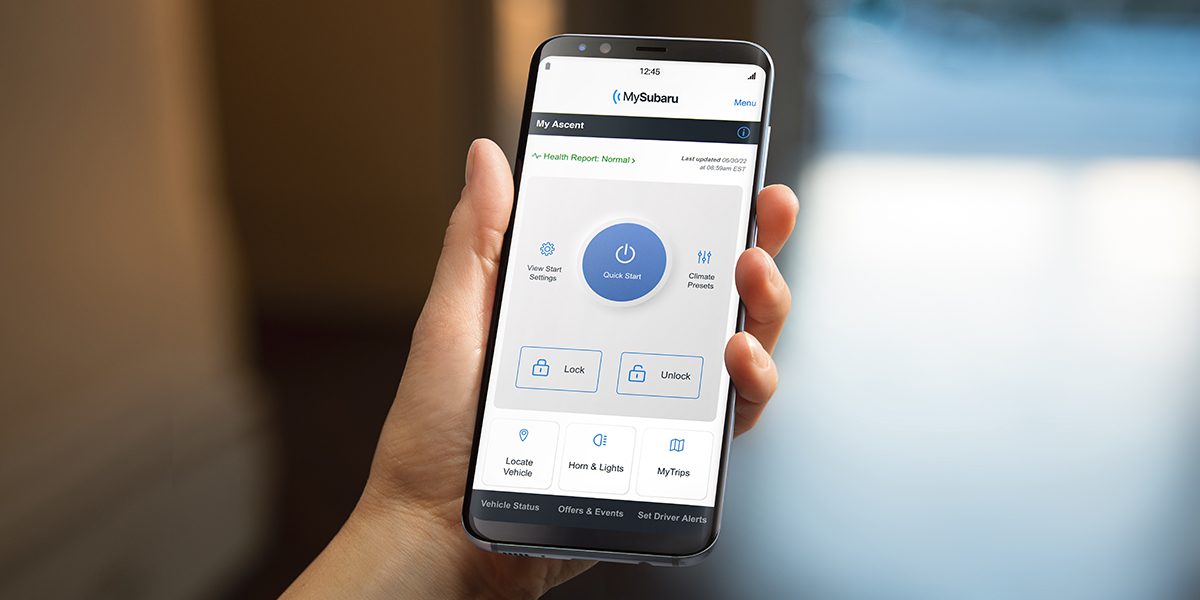
The MySubaru App is the official mobile companion designed to keep you seamlessly connected to your vehicle. Available for iPhone and Android, it brings ultimate convenience right to your smartphone. If your Subaru is equipped with STARLINK Connected Services, you can unlock a suite of powerful features:
- Remote Controls: Start your engine on cold mornings, lock/unlock doors, or locate your car in a crowded lot.
- Smart Maintenance: Track your vehicle's health, view past service records, and schedule your next appointment instantly.
- Instant Updates: Access crucial vehicle diagnostics whenever you need them.
Ready to get started? Download the MySubaru App today from the Apple App Store or Google Play Store.
How to Download and Create Your MySubaru Account
4 Quick Steps to Set Up the MySubaru App
- Step 1: Download "MySubaru" from the Apple App Store or Google Play Store.
- Step 2: Tap Create an Account, fill in your details, and click the verification link sent to your email.
- Step 3: Log in and add your vehicle using its VIN. (The app will automatically guide you through STARLINK activation if your vehicle is equipped!).
- Step 4: Enable notifications and biometric login (Face ID/Touch ID) for secure, instant access.
Stuck at any point? The team at i.g. Burton Subaru of Glen Burnie is happy to assist you with downloading, creating an account, and syncing your vehicle. Drop by today or send us a message!
Linking Your Vehicle to MySubaru
Once your account is set up, linking your vehicle takes just a few moments.
Step 1: Locate Your VIN
Step 1: Locate Your VIN
- Before you begin, find your Vehicle Identification Number (VIN). It is a 17-character code located on:
- The driver's side dashboard (visible through the windshield)
- The driver's side door jamb sticker
- Your vehicle registration or insurance documents
Step 2: Link Your Vehicle
- Log in to the MySubaru App, tap Add a Vehicle, and enter your VIN. Once verified, your car will automatically link to your profile.
Step 3: Activate STARLINK Connected Services
- If your Subaru features STARLINK Connected Services, the app will prompt you to complete activation. Follow the on-screen steps to confirm ownership, accept the terms, and activate your subscription. Once finalized, you'll unlock features like remote start, remote lock/unlock, vehicle locator, and health alerts.
Having Trouble Connecting? If you run into any issues during the process, try these quick fixes:
- Check the Code: Double-check that every digit of the VIN was entered correctly.
- Verify Eligibility: Ensure your specific model year is eligible for MySubaru and STARLINK services.
- Update the App: Make sure you are running the latest version from your app store.
Still stuck? The knowledgeable team at i.g. Burton Subaru of Glen Burnie is always ready to assist. Stop by the dealership or give us a call, and we will get you connected in no time!
Top Features of the MySubaru App
The MySubaru App brings a massive lineup of features directly to your phone, ensuring you stay connected to your car wherever the road takes you. With an active subscription, you can unlock:
- Remote Access: Start your car on a freezing morning, adjust your climate control, lock the doors, or locate your vehicle in a busy lot.
- Smart Upkeep: Track your tire pressure and fuel level, receive vehicle health diagnostics, check your mileage, and look over past service records.
- On-Demand Assistance: Gain extra peace of mind with emergency safety features like Automatic Collision Notification, SOS Assistance, Stolen Vehicle Recovery, and 24/7 Roadside Assistance.
From adjusting your driver profiles to looking up a quick tip in your digital owner's manual, the MySubaru App makes vehicle ownership completely seamless. Check out all the Subaru models that offer the MySubaru App.
Can I Schedule Subaru Service Using the MySubaru App?
Yes, you absolutely can! The MySubaru App is the easiest way to keep your vehicle running like new by allowing you to book appointments directly from your smartphone. How it simplifies your maintenance:
- Smart Scheduling: Book your next oil change, tire rotation, or brake inspection with the certified service team at i.g. Burton Subaru of Glen Burnie in just a few taps.
- Custom Reminders: Receive automated alerts when your vehicle is due for routine care based on your specific mileage.
- Digital Paperwork: View your Subaru's recommended maintenance timeline and automatically log completed appointments to build a seamless, paperless service history.
Skip the phone call and take the hassle out of car care—open your app and schedule your next visit today!
Pro-Tips to Maximize Your MySubaru App Experience
Want to unlock the full potential of your app? Use these quick tips to stay connected, secure, and ahead of your vehicle's maintenance:
- Never Miss an Update: Enable push notifications to get instant vehicle alerts, maintenance reminders, and service status updates right on your lock screen.
- Log In Faster: Set up biometric authentication (like Face ID, Touch ID, or fingerprint scanning) for lightning-fast, secure access without typing your password every time.
- Run a Digital Checkup: Regularly open your Vehicle Health Information dashboard to monitor your car's performance and address minor maintenance needs before they become major issues.
- Stay Up to Date: Keep your app up to date to the latest version in your app store to ensure you always have access to new features, top-tier security patches, and optimal performance.
- Maximize STARLINK: Take some time to explore the full suite of active connected features available for your specific model to get the ultimate blend of safety, convenience, and control.
Have questions? Our friendly team is always happy to help!
Get Help Setting Up the MySubaru App at i.g. Burton Subaru of Glen Burnie
Whether you need help downloading the app, connecting your vehicle, or activating your STARLINK Connected Services, our friendly tech experts are here to walk you through it step by step. Plus, our certified Subaru service department is always on hand to take care of your routine maintenance and ensure your vehicle's software systems are fully updated. We are conveniently located just 20 minutes from Baltimore via MD-295 S and I-695 E, making us an easy trip for drivers throughout the area. Stop by during your next service visit for personalized, one-on-one assistance with your MySubaru App, or click here for turn-by-turn directions to our dealership.
Make Every Drive Easier with the MySubaru App from i.g. Burton Subaru of Glen Burnie.
The MySubaru App brings together the best of modern driving—putting maintenance tracking, remote car diagnostics, and smart vehicle controls right in your pocket. If you need a hand syncing your vehicle or configuring your STARLINK subscription, the team at i.g. Burton Subaru of Glen Burnie has you covered. Drop by our showroom, conveniently situated just 20 minutes outside of Baltimore, for one-on-one assistance. Fill out our quick contact form below to get help with the app, schedule a service window, or view our newest vehicle arrivals!
Key Takeaways
Q: What is the MySubaru App used for?
A:
The MySubaru App is used to manage your Subaru from your smartphone, including remote vehicle functions, maintenance tracking, service scheduling, and access to STARLINK Connected Services
Q: Is the MySubaru App free to use?
A:
Yes, the app is free to download and use. However, certain remote features and safety services may require an active STARLINK subscription depending on your Subaru model.
Q: Can I schedule service through the MySubaru App?
A:
Yes, the app allows you to schedule maintenance, view recommended services, receive alerts, and track your service history.

Final dealer price includes the dealer discount, manufacturer rebates where applicable, destination and delivery charges, and dealer processing fee of $799 (not required by law). Prices exclude taxes and tag/titling fees. Not all customers will qualify for all available rebates and incentives. Financing and leasing offers subject to credit approval. Prices and availability subject to change without notice. Final dealer price expires at the end of each business day. Our inventory and offers are updated daily and we strive to ensure that our websites are kept as current as possible. While we make every effort to ensure the data listed here is correct, there may be instances where rebates, incentives, options, or vehicle features may be listed incorrectly. Please contact us to verify vehicle availability, payment, price, and options. Dealer cannot be held liable for omissions, as well as human, technical, photographic, or typographic errors prior to sale. If an error occurs, we make every effort to rectify it within a reasonable amount of time. Stock OEM pictures may not represent the actual vehicle (Options, colors, trim, and body style may vary). Specifications, features, safety, and warranty data are based on what is available as standard specs/features per trim level, for the designated model year and may not apply to vehicles with added packages or options. Dealer-installed options may include additional fees. Vehicles may be in transit to i.g. Burton, please call to verify availability. TSRP (Total Suggested Retail Price) is not equivalent to the dealer's asking price. For gasoline, diesel, and hybrid fueled vehicles, MPG City/Hwy is the combined fuel economy. It is a weighted average that is calculated by weighting the city miles-per-gallon value by 55% and the highway miles-per-gallon value by 45%. It provides a quick and easy comparison of fuel economy across vehicles. These estimates are contingent on ideal conditions within a lab. Real-world situations such as carrying passengers or cargo, using climate control, driving style, and ambient temperatures can affect actual metrics.
More Info